
When I first heard about Copy.ai freelance writing and using AI to make money as a freelance writer, I was skeptical. I’d spent years grinding over blog posts, product descriptions, and email campaigns. The idea that a tool could handle half that work felt like cheating. But also… kind of exciting?
Then I actually tried Copy.ai freelance writing and everything changed. Not overnight, not magically , but in a very real, practical, income-shifting way. If you’ve been thinking about starting a freelance copywriting side hustle but keep hitting a wall (too slow, too tired, not sure what to write), this article is for you.
I’m going to walk you through exactly how to use Copy.ai to launch a real freelance writing business , from setting up your first free account to landing clients and pricing your services like a pro. Let’s get into it.
What Is Copy.ai and Why Does It Matter for Freelancers?
Copy.ai is one of the most well-known AI content creation tools on the market right now. It’s designed to help you write faster , ad copy, blog intros, email sequences, product descriptions, social media captions, you name it.
When it comes to Copy.ai freelance writing, think of it like having a writing assistant who never runs out of ideas and doesn’t need coffee breaks. You give it a prompt, a tone, and some context, and it spits out draft content in seconds. You then polish it, add your voice, and deliver it to a client.
What makes Copy.ai especially useful for beginners is the free AI tool tier. You can start with a free plan that gives you access to a solid range of templates without spending a dime. That means zero startup cost if you’re just testing the waters.
In the US freelance economy , which now includes over 70 million workers according to Upwork , speed is money. Copy.ai gives you that speed.
How to Start a Copy.ai Freelance Writing Business: Step by Step
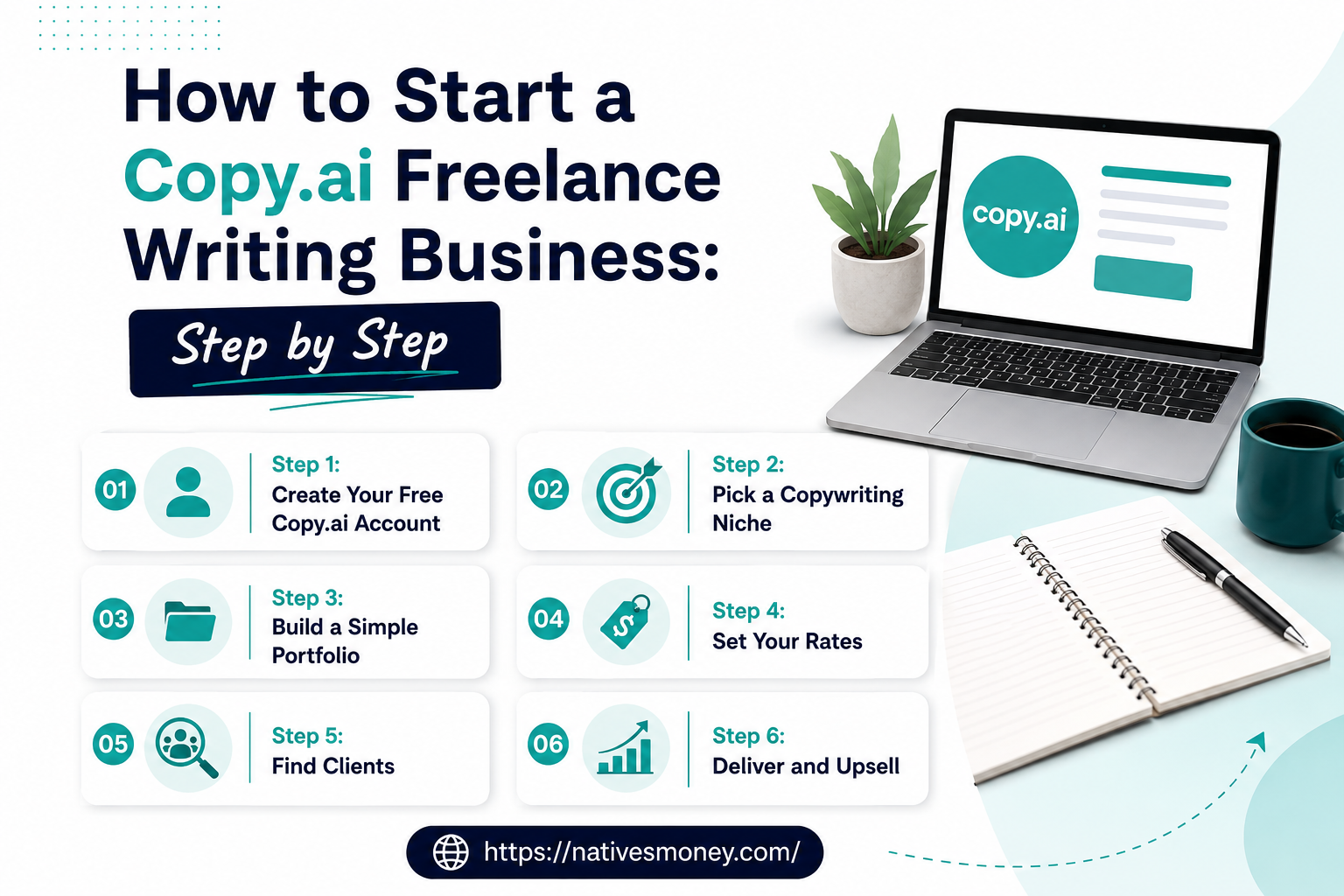
Step 1: Create Your Free Copy.ai Account
When learning Copy.ai freelance writing, head to Copy.ai and sign up for free. No credit card needed. The free plan lets you use the tool’s core templates, which is more than enough to land your first few clients. Once you’re in, explore the dashboard—blog wizards, social media tools, email writers, and more.
Step 2: Pick a Copywriting Niche
When learning Copy.ai freelance writing, don’t try to write everything for everyone. The freelancers making real money are the ones who specialize. Here are a few niches that pay well in the US market:
- E-commerce product descriptions (especially Shopify stores)
- Real estate listing copy
- Email marketing for SaaS brands
- LinkedIn content for executives and consultants
- Local business website copy (restaurants, lawyers, dentists)
Pick one or two that align with your existing knowledge. If you’ve worked in healthcare, write for medical practices. If you have a finance background, target fintech startups.
Step 3: Build a Simple Portfolio
When learning Copy.ai freelance writing, before you land a paying client, you need samples. Use Copy.ai to write three to five spec pieces—fake but realistic copy for made-up businesses in your niche. Then post them on a free site like Canva, Notion, or even a simple Google Doc portfolio.
You don’t need a fancy website. You just need proof you can write.
Step 4: Set Your Rates
When learning Copy.ai freelance writing, this is where most new freelancers undervalue themselves. Here’s a basic US market rate guide for copy:
- Blog posts (800–1,500 words): $75–$250 per post
- Email sequences (5 emails): $200–$600
- Website homepage copy: $300–$1,000
- Social media packages (monthly): $400–$1,500
With Copy.ai handling your first drafts, you can complete a blog post in under an hour. Do the math , that’s a strong hourly rate.
Step 5: Find Clients
Here’s where to start looking in the US:
- Upwork and Fiverr: Great for beginners. Lower rates initially, but good for building reviews.
- LinkedIn: Message small business owners and marketing managers directly.
- Facebook Groups: Join entrepreneur and small business groups and offer value before pitching.
- Local networking: Chambers of commerce, local business meetups, and referrals.
Step 6: Deliver and Upsell
Once you have a client, deliver more than expected. Use Copy.ai’s ai content creation tools to produce variations, test headlines, or add bonus content. Happy clients refer friends and hire again.
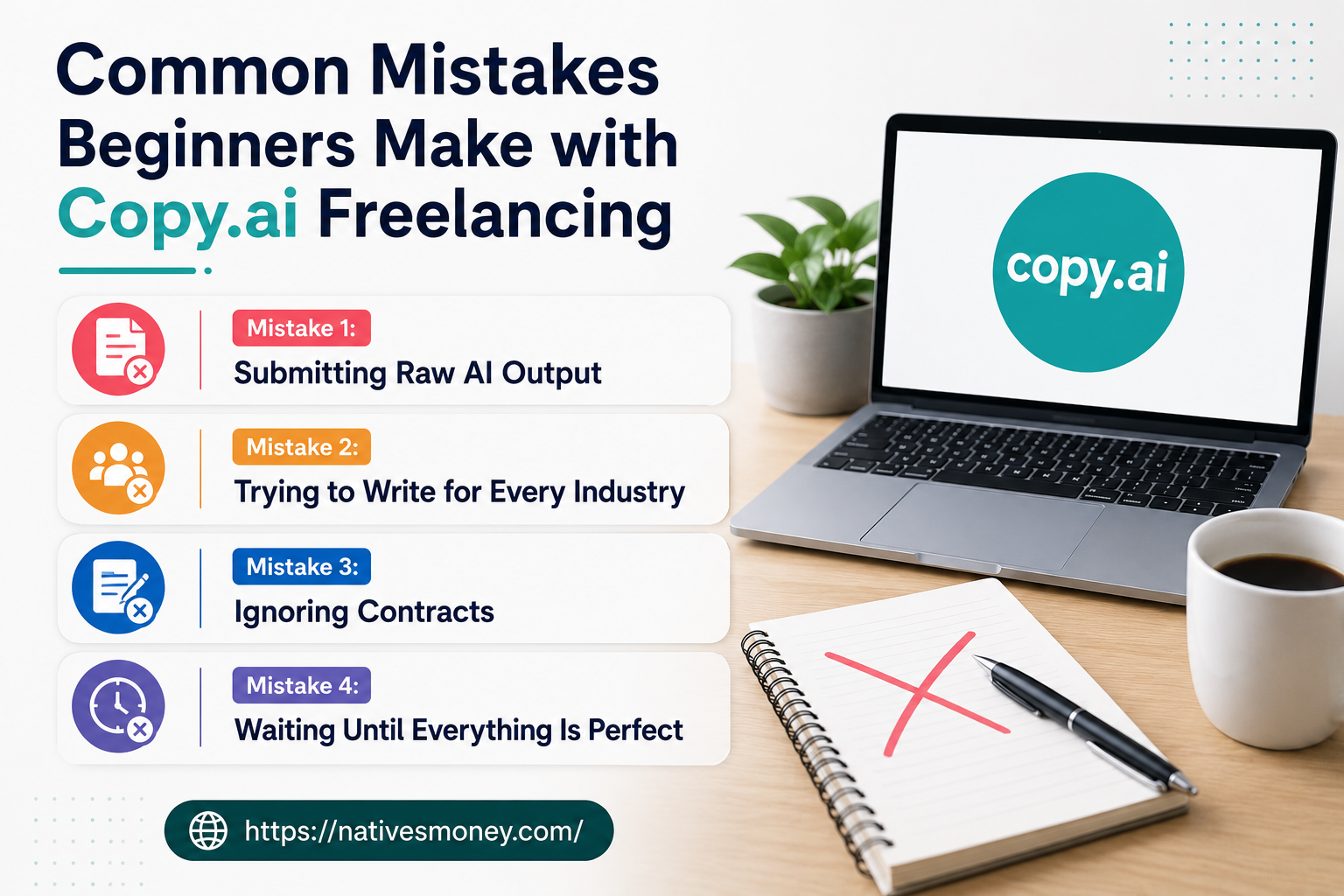
Common Mistakes Beginners Make with Copy.ai Freelancing
I’ve made these. So have most people starting out. Learn from them.
Mistake 1: Submitting Raw AI Output
Copy.ai is a starting point, not a final draft. I made the mistake early on of barely editing the AI output before sending it to a client. They noticed. It felt generic, off-brand, and impersonal.
Always rewrite for voice, add specific details, and inject personality. The AI handles structure; you provide the soul.
Mistake 2: Trying to Write for Every Industry
Niching down feels limiting at first. But a generalist writer competes with thousands of people. A specialist in, say, B2B SaaS email copy competes with dozens. Specialize early and charge more.
Mistake 3: Ignoring Contracts
Even for small gigs, always use a simple contract. Specify deliverables, revision rounds, payment terms, and usage rights. Platforms like Bonsai and HelloSign offer free templates for US freelancers. Protect yourself.
Mistake 4: Waiting Until Everything Is Perfect
Your portfolio doesn’t need to be perfect. Your rates don’t need to be perfect. Launch messy, improve as you go. The freelancers who make real money are the ones who started before they were ready.
What to Realistically Expect: Income and Timelines
Let’s be real. You’re not going to replace your salary in the first month. But here’s what a realistic timeline looks like:
Month 1–2: Setup and First Clients
Expect to spend time building your portfolio, setting up profiles on Upwork or Fiverr, and pitching. You might land one or two small gigs. Income: $0–$500. That’s normal.
Month 3–4: Building Momentum
With reviews on your profile and a growing portfolio, you start getting inbound interest. You raise your rates slightly. Income: $500–$1,500/month.
Month 5–6: Real Side Hustle Income
You have repeat clients, a referral or two, and a rhythm. Some freelancers hit this level full-time by month six. Income: $2,000–$4,000+/month if you’re consistent.
Note: As a US-based freelancer, you’ll want to track income for taxes. Set aside roughly 25–30% for self-employment tax. Tools like Wave or QuickBooks Self-Employed make this easy. Consider speaking with a CPA once you’re earning consistently.
Best Tools and Resources for Your Copy.ai Freelance Business
Here are the tools I actually use and recommend:
1. Copy.ai (Free + Paid Plans)
Obviously. Start with the free AI tool plan and upgrade only when you’re earning enough to justify it. The free plan covers most beginner needs.
2. Jasper AI (for longer content)
Once you’re writing longer-form blog content, Jasper pairs well with Copy.ai. Use Copy.ai for short copy and hooks, Jasper for deep dives and articles. Both are among the best AI tools for business writing today.
3. Grammarly + Hemingway Editor
When doing Copy.ai freelance writing, these free tools help clean up both AI-generated and human writing. Grammarly catches grammar issues, while Hemingway makes sure your sentences aren’t bloated. Run every piece through both before delivery.
4. Bonsai (Contracts + Invoicing)
Bonsai is built for US freelancers. It handles contracts, proposals, and invoicing in one place. The free plan is enough to get started.
For more on entrepreneurship tools and side hustle strategies, check out the
For more insights on building your business, explore the Entrepreneurship section at nativesmoney.com for articles on starting and scaling your income.
Final Thoughts: Is Copy.ai Freelance Writing Worth It?
Yes , if you treat it like a real business and not a get-rich-quick scheme. Copy.ai freelance writing gives you speed, scale, and a lower barrier to entry than traditional copywriting. But you still need the human element: strategy, client relationships, editing, and niche expertise.
The tools are better than ever. The freelance economy is wide open. The only thing standing between you and your first paying client is the decision to start.
If this got you thinking, head over to nativesmoney.com for more real-talk guides on side hustles, entrepreneurship, and building the kind of income that actually changes your life. You’ve got this.
Frequently Asked Questions
Can I really make money with Copy.ai freelance writing?
Yes. Many freelancers in the US use Copy.ai freelance writing to produce copy faster and take on more clients than they could handle manually. The key is treating it as a business, not a passive income scheme. Consistent effort, good clients, and quality editing are what drive real income.
Is Copy.ai a free AI tool or do you need to pay?
Copy.ai offers a free plan that’s genuinely useful for beginners. It includes access to core templates and a limited number of runs per month. As your business grows and you need more volume, their paid plans start at around $36/month. For most new freelancers, the free tier is plenty to start.
What types ofCopy.ai freelance writing is best for?
When it comes to Copy.ai freelance writing, it shines for short-to-medium form copy: email campaigns, product descriptions, social media captions, ad copy, and blog introductions. It’s one of the most versatile AI content creation tools available for these formats. For very long-form or research-heavy content, you’ll want to supplement it with your own writing.
How do I find clients for Copy.ai freelance writing?
Start with platforms like Upwork, Fiverr, and LinkedIn. Local business outreach and Facebook entrepreneur groups are also highly effective for US-based freelancers. Focus on one niche, build a portfolio of samples, and pitch consistently. Your first few clients are often just one conversation away.
What are the best AI tools for business writing alongside Copy.ai?
The best AI tools for business writing include Copy.ai for short-form copy and hooks, Jasper for long-form content, Grammarly for proofreading, and Hemingway Editor for clarity. Together, these tools cover nearly every writing need a freelance copywriter faces. Most have free plans or trials, so you can test before committing.